Video Resolution Explained: 720p vs 1080p vs 4K
Video resolution describes how many individual pixels make up each frame of a video, and the three most common tiers 720p, 1080p, and 4K each contain a dramatically different amount of visual detail, with 4K offering roughly four times the pixel count of 1080p.
Understanding resolution matters for more than just picking a viewing quality setting it directly determines how sharp any frame you extract from that video can possibly be, since no extraction method can add detail beyond what the source resolution actually captured.
What resolution actually measures
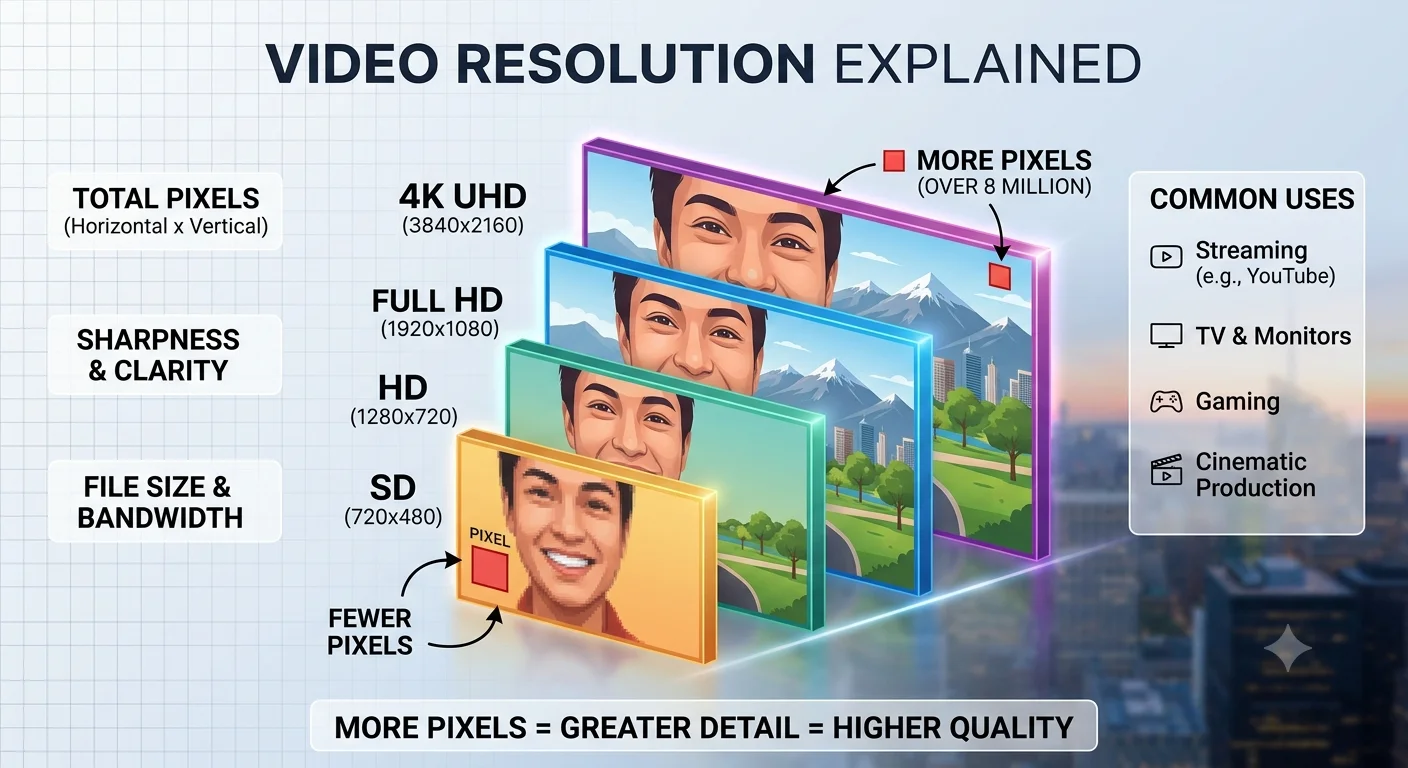
Every video frame is made up of a grid of tiny pixels, and resolution describes the dimensions of that grid how many pixels wide and how many pixels tall. More pixels means more fine detail can be captured and displayed in each frame.
720p: standard high definition
- What resolution actually measures
- 720p: standard high definition
- 1080p: full high definition
- 4K: ultra high definition
- Why more resolution matters specifically for frame extraction
- How to check what resolution a video actually is
- Does resolution alone guarantee a sharp frame?
- Choosing the right resolution for your own recordings
- Conclusion
- FAQ
720p refers to a resolution of 1280 by 720 pixels, and was one of the earliest widely-used high-definition standards.
Common uses: older video content, lower-bandwidth streaming situations, and some webcam or video call recordings that don't need higher resolution.
What it means for frame extraction: a 720p frame is noticeably softer than higher resolutions once viewed at full size or printed, and it has limited room for cropping into a smaller portion of the frame without visible quality loss.
- How to Save a Frame from an Instagram Reel
- How to Capture Video Frames Using Windows Photos App
- How to Download a YouTube Thumbnail in Full Resolution
1080p: full high definition
1080p refers to a resolution of 1920 by 1080 pixels, and has been the most common standard for online video, streaming, and broadcast content for a long time.
Common uses: the default upload and viewing resolution for a huge amount of everyday video content, from YouTube uploads to phone recordings to most streaming platforms.
What it means for frame extraction: 1080p offers enough detail for a clean, sharp frame that works well for most everyday uses social media posts, blog images, moderate wallpaper use though heavy cropping into a small portion of the frame can start to show softness.
4K: ultra high definition
4K refers to a resolution of roughly 3840 by 2160 pixels, containing about four times as many total pixels as 1080p.
Common uses: modern smartphone cameras, professional video production, and increasingly common as the default recording resolution on newer devices.
What it means for frame extraction: a 4K frame contains dramatically more detail, giving you significant room to crop into a smaller portion of the image while still maintaining a sharp result, and it's genuinely suitable for print or large-format use in a way lower resolutions often aren't.
Why more resolution matters specifically for frame extraction
When you extract a single still frame from a video, you're essentially taking a snapshot limited entirely by that video's resolution at that moment. This has a few practical implications:
Cropping headroom. A 4K frame can be cropped down to focus on a smaller portion of the image and still end up at a resolution comparable to a full 1080p frame, since you're starting with roughly four times the pixel detail. A 720p frame has very little room to crop before quality drops noticeably.
Print and large-display use. If you plan to print an extracted frame or display it on a very large screen, resolution matters more than it does for typical online sharing, since more pixels are needed to maintain sharpness at a larger physical size.
Recommended Articles
 LEARN THE BASICS
 LEARN THE BASICS
 LEARN THE BASICS
File size trade-offs. Higher resolution also means larger file sizes, which matters if you're working with tools that have upload limits, or if storage space for extracted frames becomes a consideration when working with many images.
How to check what resolution a video actually is
For an uploaded YouTube video, open the quality settings in the player the available options (such as 480p, 720p, 1080p, or 2160p for 4K) reflect what resolutions actually exist for that specific upload.
For a local video file, right-click the file and check its properties or details panel, which typically lists the exact pixel dimensions directly.
Does resolution alone guarantee a sharp frame?
Not entirely resolution sets the ceiling for how much detail is possible, but a few other factors also affect the final result:
- Compression can soften detail even within a high-resolution video, especially in busy or high-motion scenes
- Motion blur from fast movement affects sharpness independently of resolution, since it's a property of how the footage was originally captured
- Focus quality in the original recording limits detail regardless of resolution a genuinely out-of-focus 4K frame won't be sharper than a well-focused 1080p frame of the same subject
Resolution is necessary for a sharp extracted frame, but it isn't the only factor.
- How to Extract a Frame for a YouTube Thumbnail
- Best Free vs Paid Frame Grabber Tools Compared
- How to Screenshot on iPhone (All iOS Versions)
Choosing the right resolution for your own recordings
If you're recording your own video with future frame extraction in mind:
- Record in the highest resolution your device supports, if storage space allows, since this gives you the most flexibility later, especially for cropping.
- Don't assume higher resolution fixes every quality issue good lighting and steady, in-focus footage matter just as much as resolution itself.
- Consider your actual end use if you only ever share frames in small social media posts, 1080p is often more than sufficient, and 4K's extra detail may not be necessary for every project.
Conclusion
Resolution sets the fundamental ceiling on how much detail an extracted frame can contain, with 4K offering roughly four times the pixel detail of 1080p, and 1080p offering considerably more than 720p. Higher resolution gives you more room to crop, print, or display an extracted frame at a large size, but it works alongside other factors like compression, motion blur, and focus all of which matter together in determining how sharp your final extracted frame actually looks.
FAQ
Is 4K always better than 1080p for frame extraction?
For sharpness and cropping flexibility, yes but 4K also means larger file sizes, which may not matter for every use case, especially casual, everyday sharing where 1080p is often plenty.
Can I convert a 1080p video to 4K to get sharper extracted frames?
No, upscaling software can enlarge a 1080p video, but it's generating estimated detail through algorithms rather than recovering genuine extra resolution that was never recorded in the first place.
Why does my 4K video's extracted frame still look slightly soft?
This is usually due to compression, motion blur, or a focus issue in the original recording, all of which affect sharpness independently of resolution.
What resolution do I need for a good YouTube thumbnail?
YouTube recommends a minimum of 1280 by 720 pixels, which sits at the 720p tier, though extracting from higher-resolution source footage gives you more flexibility for cropping and composition.
Does higher resolution always mean a larger file size?
Generally yes, since more pixels means more data to store, though the exact file size also depends on compression settings and format, not resolution alone.